EZ Inventory Update: Change in Shopify Quantity Now Available in the Activity Log Details

EZ Inventory keeps a detailed record of each inventory update job in the "Activity Log".

When viewing the "Activity Log Details", it will tell you the status of every item being updated, when the update occurred, the type of update, and the quantity from the source data feed.

We've recently pushed an update to also now include a column to show the change in quantity (the delta) in Shopify after the stock update:
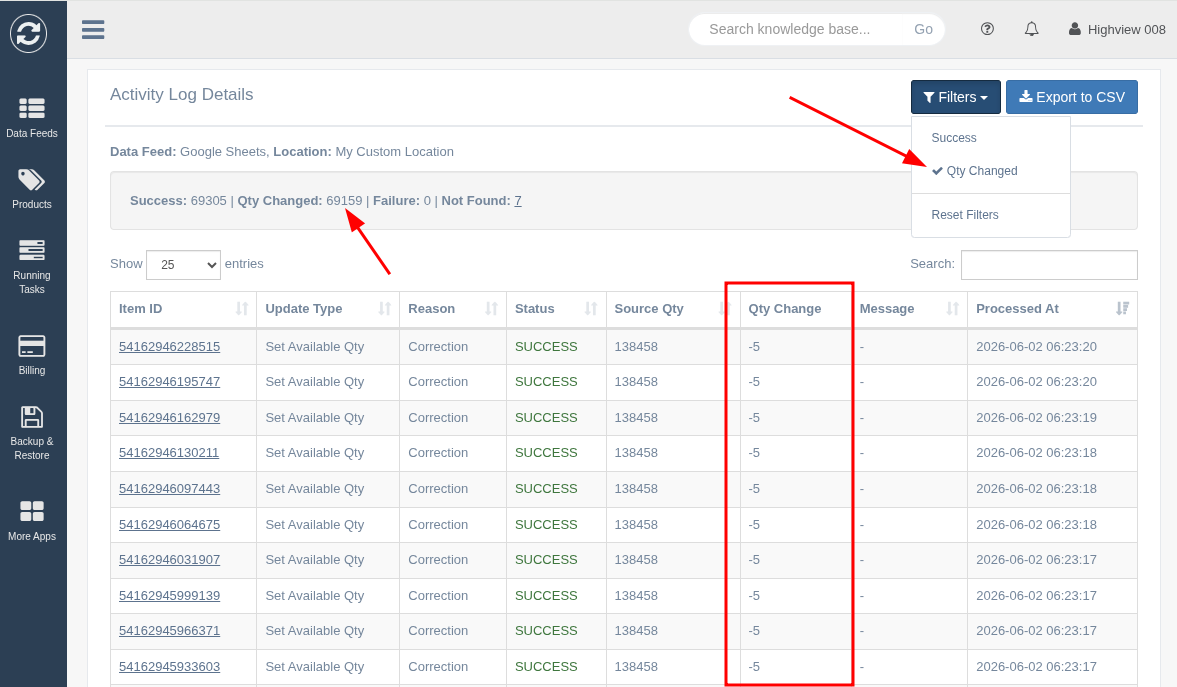
This column will contain numbers that start …

Read more

EZ Inventory Update: Set Inventory Adjustment Reason

You can now specify an "Adjustment Reason" from a list of reasons when syncing/updating Shopify inventory quantities using EZ Inventory.

The following adjustment reasons are available in the app:

Display Name API Value Description
Correction correction
Used to correct an inventory error or as a general adjustment reason.
Count cycle_count_available
Used to specify an adjusted inventory count due to a discrepancy between the actual inventory quantity and previously recorded inventory quantity.
Received received
Used to specify inventory that the …
Read more

EZ Inventory Update: Set "On Hand" Quantity in Shopify

A new inventory update type "Set On Hand Qty" has been added to EZ Inventory.  This allows you to set/overwrite the "on hand" quantities of variants in Shopify by location.

For a long time, we've only supported updating the "Available" quantity as users of our app tend to manage inventory outside of Shopify (their "source of truth") and they just want to make sure the "Available" quantity in Shopify is up to date with their external systems so they …

Read more

EZ Inventory Update: Additional Info on the Activity Log Details Page

We've pushed an update to EZ Inventory's "Activity Log Details" page to show a summary count of items by update status (e.g. success, failure, skipped, removed).

You can also find a link on this page that allows you to quickly download a list of items that exist in the source data/inventory feed, but weren't found in Shopify.

In most cases, a supplier feed will contain a lot more items that the merchants carry in their store, so the merchants …

Read more

EZ Inventory: Automatically Set Removed Items to 0

We're excited to announce a new feature in EZ Inventory that helps you manage your inventory in Shopify more efficiently. In the Data Feed settings, under Field Mapping > Additional Options, you'll find a new setting called "Set quantity of removed items to 0".

Note that this option is only shown when the "Inventory Update Type" is set to "Set Available Qty" (i.e. when overwriting the available quantity in Shopify).

How It Works

  1. The app checks the …
Read more