
Add Multiple Tracking Numbers To A Single Fulfillment
EZ Fulfill allows you to add multiple tracking numbers to a single fulfillment when fulfilling your orders by order or by SKU.
Enable Multiple Tracking Numbers Per Fulfillment
By default, this feature is disabled for backward compatibility. Without this enabled, a tracking number like 1Z999,1Z888 is uploaded as a single entry (literally "1Z999,1Z888"), which is likely not what you want. Enable this to split tracking numbers using commas.
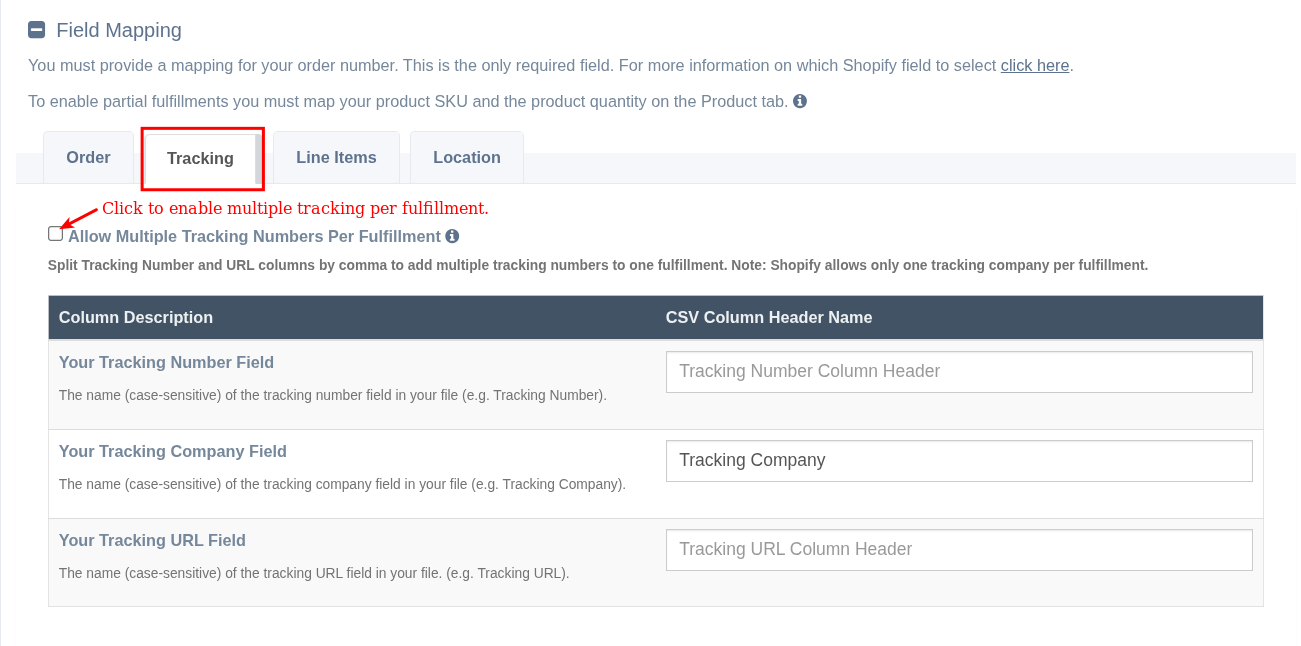
Click the Allow Multiple Tracking Numbers Per Fulfillment checkbox on your Data Feed's Tracking tab to enable multiple tracking numbers per fulfillment.
File Format
When uploading multiple tracking numbers to a single fulfillment, EZ Fulfill expects you to have your tracking numbers and tracking URLs (if this field is enabled) in the same cell, separated by commas. The app will split tracking numbers by comma and add them to the fulfillment when sending to Shopify (this applies to tracking URLs as well).
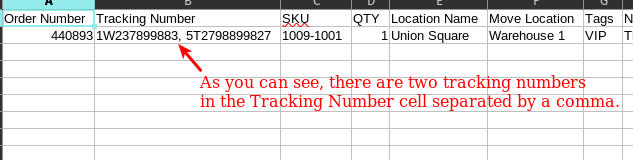
If you are uploading tracking numbers and tracking URLs, the order matters. We will match the tracking numbers and URLs that are split when they are sent to Shopify. You only need to include the Tracking URL column if your file contains URLs. If omitted, only tracking numbers are sent.
Important: You must provide the same number of Tracking URLs as Tracking Numbers. If you provide track1,track2 but only http://url1, the second tracking number will have no URL (unless you are using the default URL option). Empty values between commas (e.g., track1,,track2) are ignored when splitting tracking numbers.
Multiple Tracking Companies
Shopify does not allow us to add multiple tracking companies to a single fulfillment. If you want to add multiple tracking companies to your fulfillment, you can fulfill your orders by SKU, which will create multiple fulfillments per tracking number, or use Other as the tracking company and provide the tracking URL with the tracking numbers, as described above.
Related Articles:
App: EZ Fulfill
Tags: fulfillment, tracking numbers