Automate Shopify Abandoned Checkouts Export with EZ Exporter

EZ Exporter now supports exporting Shopify abandoned checkouts!

This allows you to create a custom CSV or Excel report of your abandoned checkouts data, automate the export process, and include additional fields not available in the built-in Shopify CSV export.

In addition to the standard fields such as the billing address, shipping address, and line items data, our app can also export the following:

Read more

EZ Exporter Update: Conversion Summary Data Now Available in Shopify Order Exports

We've added new "Customer Journey Summary" fields to Order exports in EZ Exporter.

These fields allow you to export the data under the "Conversion summary" section of the Shopify Admin's order detail page (ncluding the "conversions details" and "session details").

This section provides conversion information such as the following:

  • Total sessions before placing the order
  • Order index
  • Days to conversion
  • Date and time of when the first and last visits occurred
Read more

EZ Exporter Update: Events (Timeline) Fields Now Available in Shopify Order Exports

Note: Shopify pushed an update to the API in January 2026 and limited events data to a 1 year retention, so only events that occurred within the last 1 year will show up in the export (more info).

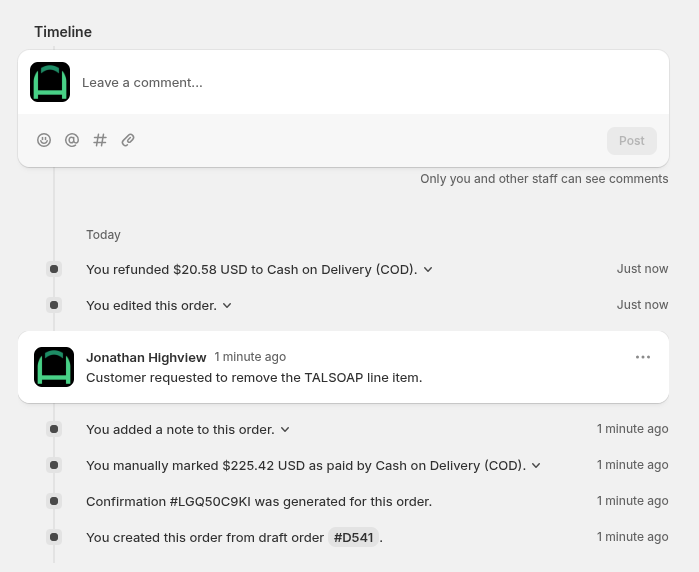
EZ Exporter now supports order "Events" fields when exporting Shopify order data. These "Events" are the entries displayed in the Order Timeline section of the Shopify Admin's order detail page:

In our app, the following fields …

Read more

EZ Exporter Update: New "Unlisted" Status in Shopify Product Exports

Shopify recently added an "Unlisted" status for products, which "hides products from store search and recommendations (including collections), all sales channels, internet searches and Shopify Catalog, while still allowing access via a direct URL"

EZ Exporter also now supports this new product status. When you create a Data Settings for Product export, you should now see an option for "Unlisted" under Filters > Status:

If you need to filter based on a combination of different status …

Read more

Automate Shopify Analytics Reports Export with EZ Exporter

EZ Exporter now supports a new Data Settings for "Analytics" data, which is available in the app's Premium Plan.

This new data type allows you to use the same ShopifyQL query in the Shopify Admin > Analytics > Reports to pull the same data. Please note, however, that our app can only export a flat table (without the charts).

With this addition, you can now use EZ Exporter to automate export of your Shopify Analytics Reports and have …

Read more