
Can I export my Shopify data directly to a Google Cloud Storage bucket?
While we don't have an official Google Cloud Storage API integration, we do have an Amazon S3 API integration which is compatible with Google Cloud Storage.
To use our Amazon S3 integration to upload files to a Google Cloud Storage bucket, you can follow the steps below.
1. From the Google Cloud Console, go to Cloud Storage > Settings > Interoperability tab.
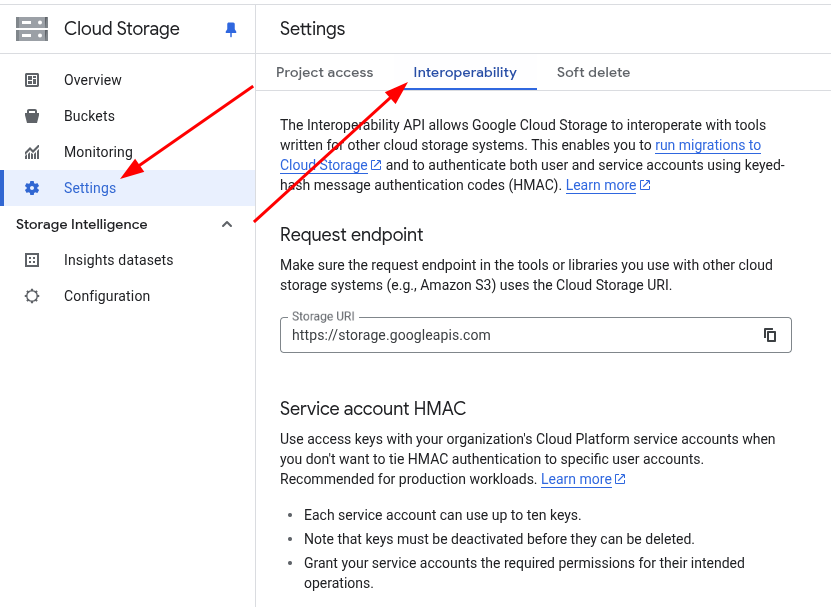
2. On this "Interoperability" page, click the "Create a key" button to generate an Access Key and Secret Key (either for service accounts or user accounts, both types are supported).
3. Back in EZ Exporter, go to Integrations > Amazon S3, and click the "Add Amazon S3 Bucket Settings" button.
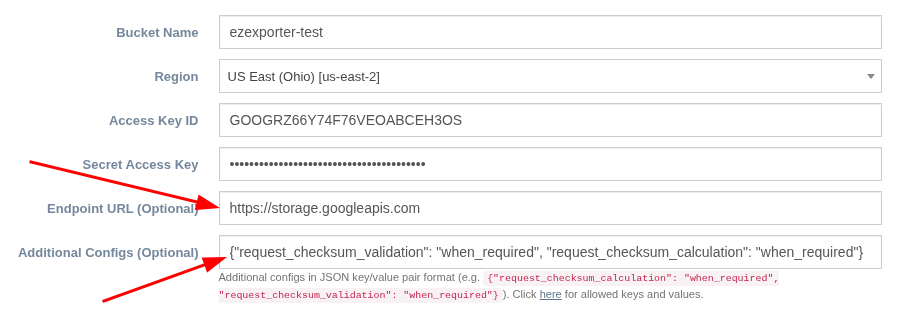
4. Enter your Google Cloud Storage bucket name, select any Region, and enter the Access Key and Secret Key you've generated via the Google Cloud Console.
These are the 2 important settings to be aware of that are specific to Google Cloud Storage:
- Endpoint URL:
https://storage.googleapis.com - Additional Configs:
{"request_checksum_validation": "when_required", "request_checksum_calculation": "when_required"}
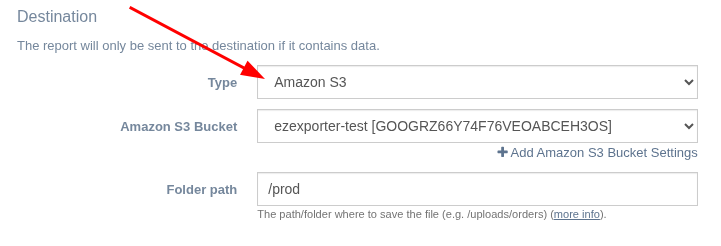
5. In the Export Profile settings, set Destination > Type to "Amazon S3" and select the Amazon S3 bucket you've created.
Related Articles:
App: EZ Exporter
Tags: gcs, google cloud storage