
How can I export a list of customer VAT Numbers / VAT IDs / Tax IDs from my Shopify store?
In EZ Exporter, create a Data Settings for Customer data and select the field below under the "Fields" section to export the VAT Number / VAT ID / Tax ID from Shopify:
tax_settings.tax_id
This is the native Shopify tax ID field that maps to the one displayed in the Shopify Admin under "Tax details" as shown below:
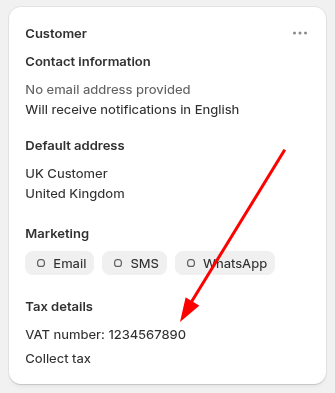
Then under the "Custom Filters" section, add this filter to only export Customer records with a tax ID:
- Tax ID is not blank
You can also use the template called "Customers with a Tax ID" which already has these configured and can be customized further.
App: EZ Exporter
Tags: b2b, taxes, vat number