
How can I include the names of the Sales Channels each product and variant is published to in my Shopify product CSV export?
EZ Exporter supports exporting the Sales Channel Names at the product level and variant level when creating a Shopify product CSV/Excel export.
Simply select the fields below under the Fields section of the Data Settings to include them:
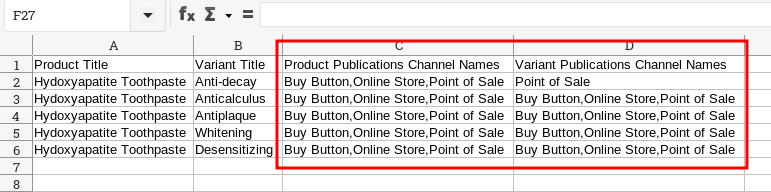
resource_publications.publication.channels.name(Product Publications Channel Names)variants.resource_publications.publication.channels.name(Variant Publications Channel Names)
The output will look something like this by default (can be reformatted using Calculated Fields):
You can also filter by these fields under the Custom Filters section in the Data Settings in case you'd like to generate reports of products/variants that are published/scheduled to be published to specific sales channels.
Related Articles:
App: EZ Exporter