
Automate Shopify Abandoned Checkouts Export with EZ Exporter

EZ Exporter now supports exporting Shopify abandoned checkouts!
This allows you to create a custom CSV or Excel report of your abandoned checkouts data, automate the export process, and include additional fields not available in the built-in Shopify CSV export.
In addition to the standard fields such as the billing address, shipping address, and line items data, our app can also export the following:
- abandoned checkout URL
- note/cart attributes
- line item properties (custom product options)
- customer metafields
- product metafields
- variant metafields
- product tags
- customer tags
- prices in the shop and presentment currencies
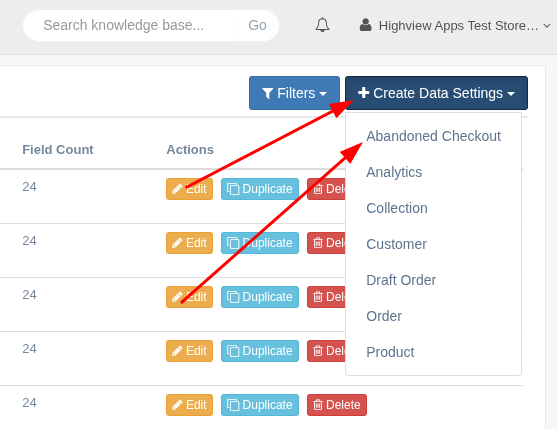
In the app, you should see a new Data Settings type for "Abandoned Checkout":
Sample use cases for this export:
- Push new abandoned checkout records to Google Sheets every 15 minutes and use that as input to other workflows.
- Get notified via email of high-value abandoned checkouts.
- Get notified via email when an abandoned checkout has been recovered.
- More advanced filtering for segmenting the data.
- More detailed abandoned checkouts reports.
On the app's "Templates" page, we've also added a new tab called "Abandoned Checkouts" with the following pre-built templates that can be customized further:
- All Abandoned Checkouts
- Closed Abandoned Checkouts
- Email Sent Abandoned Checkouts
- High Value Open Abandoned Checkouts
- High Value Recovered Abandoned Checkouts
- New Abandoned Checkouts
- Open Abandoned Checkouts
- Recovered Abandoned Checkouts
If you have any questions about this, just let us know!