
EZ Inventory Update: Set "On Hand" Quantity in Shopify

A new inventory update type "Set On Hand Qty" has been added to EZ Inventory. This allows you to set/overwrite the "on hand" quantities of variants in Shopify by location.
For a long time, we've only supported updating the "Available" quantity as users of our app tend to manage inventory outside of Shopify (their "source of truth") and they just want to make sure the "Available" quantity in Shopify is up to date with their external systems so they don't oversell.
However, we've gotten a few requests where merchants wanted to set the "On Hand" quantity instead to account for products already committed to unfulfilled orders and where the system they use doesn't have separate quantity values for different inventory states. This simplifies their process as they can simply set/overwrite "On Hand" instead of doing a separate calculation of what's actually available. Shopify will automatically adjust "Available" based on the changes to "On Hand".
Example workflow:
- In Shopify: Available = 10, On Hand = 15 (Committed = 5).
- New order for quantity 1 comes in: Available = 9, On Hand = 15, Committed = 6.
- New shipment comes in, increasing quantity available/on hand by 10 (not tracked in Shopify).
- Merchant does physical count, they now have 25 total on hand (including the 6 committed to unfulfilled orders).
- Merchant runs EZ Inventory to set "On Hand" to 25. "Available" in Shopify automatically changes to 19 (i.e. 6 are still committed to orders).
- Merchant fulfills all orders and does another physical count: Available = 19, On Hand = 19, Committed = 0 (Available in Shopify and merchant's warehouse already match without running another inventory sync to update Available).
In EZ Inventory, you'll now see this new "Set On Hand Qty" option in the list of inventory update types:
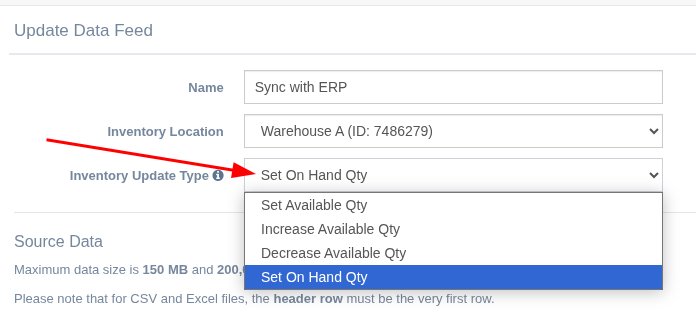
Note that increasing/decreasing the "Available" quantity will also automatically increase/decrease the "On Hand" quantity in Shopify by the same amount, which is why you don't see separate options for Increase/Decrease On Hand Qty (the Shopify API actually doesn't allow this). So if you need to Increase/Decrease On Hand Qty, simply use the Increase/Decrease Available Qty options.