
EZ Exporter Update: Conversion Summary Data Now Available in Shopify Order Exports

We've added new "Customer Journey Summary" fields to Order exports in EZ Exporter.
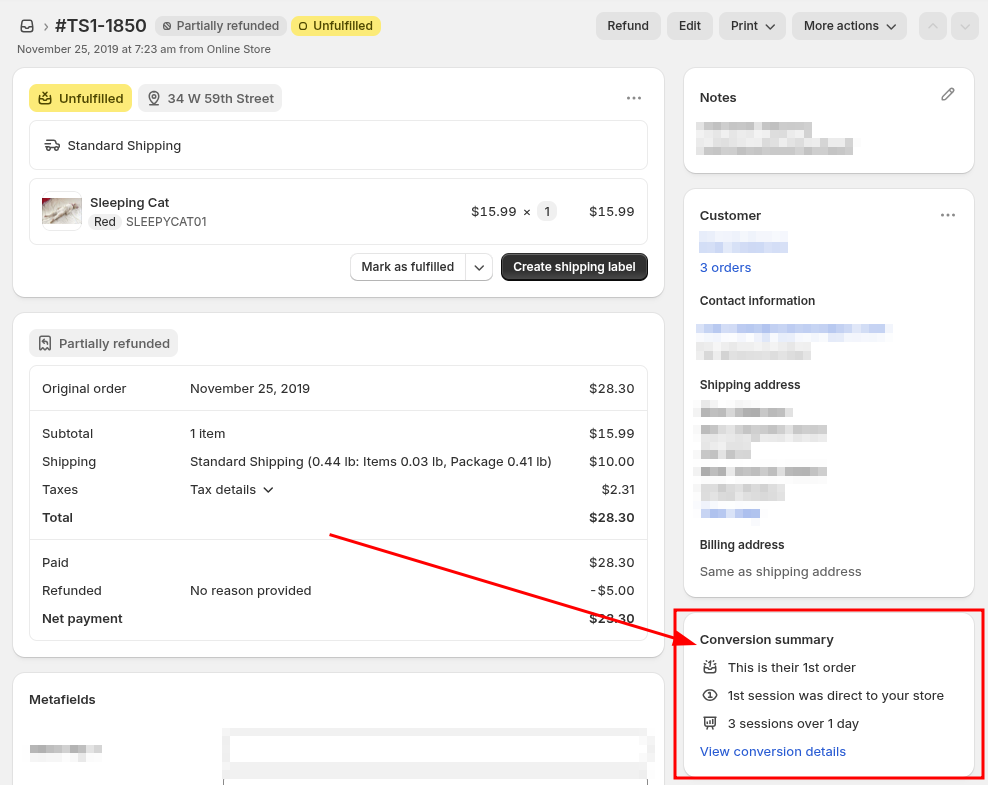
These fields allow you to export the data under the "Conversion summary" section of the Shopify Admin's order detail page (ncluding the "conversions details" and "session details").
This section provides conversion information such as the following:
- Total sessions before placing the order
- Order index
- Days to conversion
- Date and time of when the first and last visits occurred
- Landing page URLs of the first and last visits
- UTM parameters from the first and last visits
Here's an example of where this information is displayed in the Shopify Admin:
In the app, when creating or editing a Data Settings for Order data, you'll now be able to select the following fields:
customer_journey_summary.customer_order_index |
Customer Journey Order Index (type: number). The position of the current order within the customer's order history, excluding test orders. |
customer_journey_summary.days_to_conversion |
Customer Journey Days To Conversion (type: number). The number of days between the customer's first session and the order creation date. The first session represents the first session since the last order, or the first session within the 30 day attribution window, if more than 30 days have passed since the last order. |
customer_journey_summary.first_visit.landing_page |
Customer Journey First Visit Landing Page (type: text). The landing page URL of the customer's first session when visiting the shop. |
customer_journey_summary.first_visit.occurred_at |
Customer Journey First Visit Occurred At (type: datetime). The date and time when the customer's first session occurred. |
customer_journey_summary.first_visit.source |
Customer Journey First Visit Source (type: text). Source from which the customer visited the store, such as a platform (Facebook, Google), email, direct, a website domain, QR code, or unknown. |
customer_journey_summary.first_visit.utm_parameters.campaign |
Customer Journey First Visit UTM Campaign (type: text). |
customer_journey_summary.first_visit.utm_parameters.content |
Customer Journey First Visit UTM Content (type: text). |
customer_journey_summary.first_visit.utm_parameters.medium |
Customer Journey First Visit UTM Medium (type: text). |
customer_journey_summary.first_visit.utm_parameters.source |
Customer Journey First Visit UTM Source (type: text). |
customer_journey_summary.first_visit.utm_parameters.term |
Customer Journey First Visit UTM Term (type: text). |
customer_journey_summary.last_visit.landing_page |
Customer Journey Last Visit Landing Page (type: text). The landing page URL of the customer's last session before the order was placed. |
customer_journey_summary.last_visit.occurred_at |
Customer Journey Last Visit Occurred At (type: datetime). The date and time when the customer's last session occurred. |
customer_journey_summary.last_visit.source |
Customer Journey Last Visit Source (type: text). Source from which the customer visited the store, such as a platform (Facebook, Google), email, direct, a website domain, QR code, or unknown. |
customer_journey_summary.last_visit.utm_parameters.campaign |
Customer Journey Last Visit UTM Campaign (type: text). |
customer_journey_summary.last_visit.utm_parameters.content |
Customer Journey Last Visit UTM Content (type: text). |
customer_journey_summary.last_visit.utm_parameters.medium |
Customer Journey Last Visit UTM Medium (type: text). |
customer_journey_summary.last_visit.utm_parameters.source |
Customer Journey Last Visit UTM Source (type: text). |
customer_journey_summary.last_visit.utm_parameters.term |
Customer Journey Last Visit UTM Term (type: text). |
customer_journey_summary.moments_count.count |
Customer Journey Moments Count (type: number). The total number of customer moments associated with this order. Returns null/blank if the order is still in the process of being attributed. |
On the "Templates" page, we've added the following templates as well utlizing these new fields, which can be customized further:
- Conversion Summary & UTM Parameters (Last 30 Days)
- Sales by UTM Campaign (Last 30 Days)
- Sales by UTM Source (Last 30 Days)
If you have any questions about these new fields, just let us know!
Tags: ez exporter, new features, utm parameters