
EZ Inventory Update: New "Encoding" Setting for CSV Inventory Feeds

We've added a new "Encoding" setting to EZ Inventory when configuring the source data for CSV inventory feeds.
In the past, we've only supported UTF-8 character set/encoding as the vast majorify of data feeds we've seen are UTF-8 encoded, and UTF-8 encoding will also often work with other encodings.
However, we've seen a few cases where the data feeds are encoded using ISO-8859 and have column names containing accented characters which can't be read properly with UTF-8, so this could result in an error when these columns are used in the field mappings.
To handle this scenario, we've added this setting where the user can explicitly specify the encoding when reading the feed.
By default, the character encoding is set to use UTF-8, which you can then override in the Data Feed settings under Source Data > Encoding:
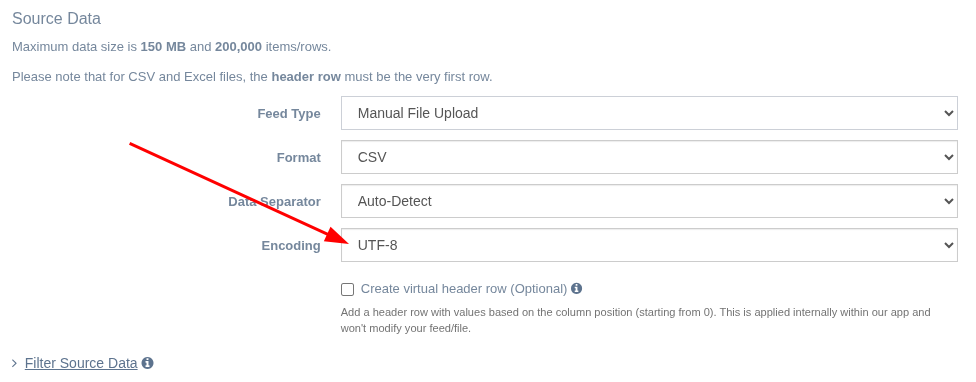
We currently have the following character encoding options available:
- UTF-8
- Windows-1252
- ISO-8859-15 (Latin-9)
- Shift JIS (Japanese)
Note that some encodings are a subset of other encodings. For example, ASCII is already a subset of UTF-8, so UTF-8 will work with ASCII-encoded files. ISO-8859-1 (Latin-1) is already a subset of Windows-1252, so Windows-1252 is compatible with Latin-1.
If you're using an encoding not covered in the list above, feel free to contact us so we can take a look and see if we can support it.
Tags: ez inventory, new features