
Upload Multiple Tracking Numbers to a Single Fulfillment With EZ Fulfill

EZ Fulfill now allows you to add multiple tracking numbers to a single fulfillment when marking your orders fulfilled. This feature was previously supported, but Shopify removed it when updating the fulfillment workflow. It has since been added back, and we are happy to support it again!
To ensure backward compatibility, we've added a new option on the Tracking tab of the Data Feed called "Allow Multiple Tracking Numbers Per Fulfillment". Because fulfillment data is critical, we made this an opt-in feature to prevent surprises with existing CSV formats.
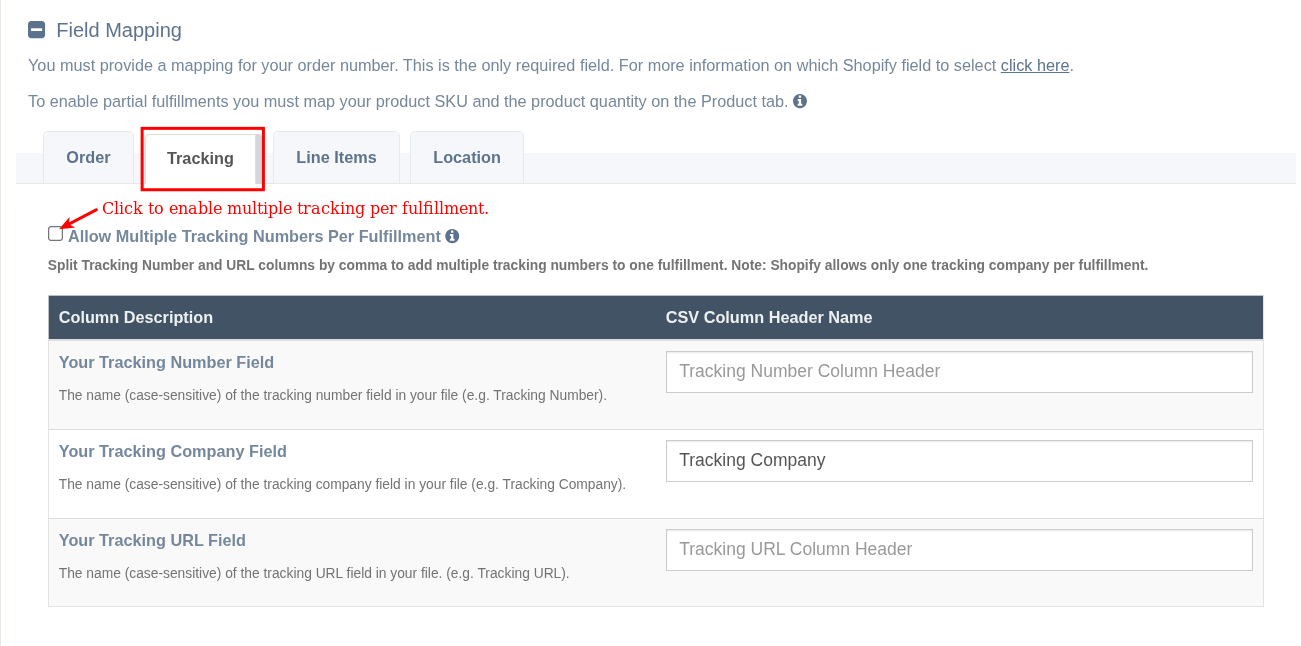
When this option is enabled, EZ Fulfill will split the tracking numbers (and, if mapped, tracking URLs) by a comma and send them to Shopify as separate tracking numbers. At this time, we only support adding multiple tracking numbers, separated by commas, in a single cell.
At this time, Shopify does not support adding multiple tracking companies to a single fulfillment, so the tracking numbers that you upload must belong to the same tracking company. This is the same behavior when adding multiple tracking numbers to a fulfillment in the Shopify admin. If you would like to upload multiple tracking numbers from different tracking companies, you have can do the following:
- You can fulfill the order by SKU and map the tracking number and tracking company, which will create a new fulfillment for each tracking company and tracking number you provide. You can read the documentation on how this works here.
You can read our documentation for a full walkthrough on how this feature works here.