
EZ Exporter Update: New Shipping Address Validation Status Field in Shopify Order Exports

You can now include the field shipping_address.validation_result_summary (Shipping Address Validation Status) when exporting Shopify order data with EZ Exporter.
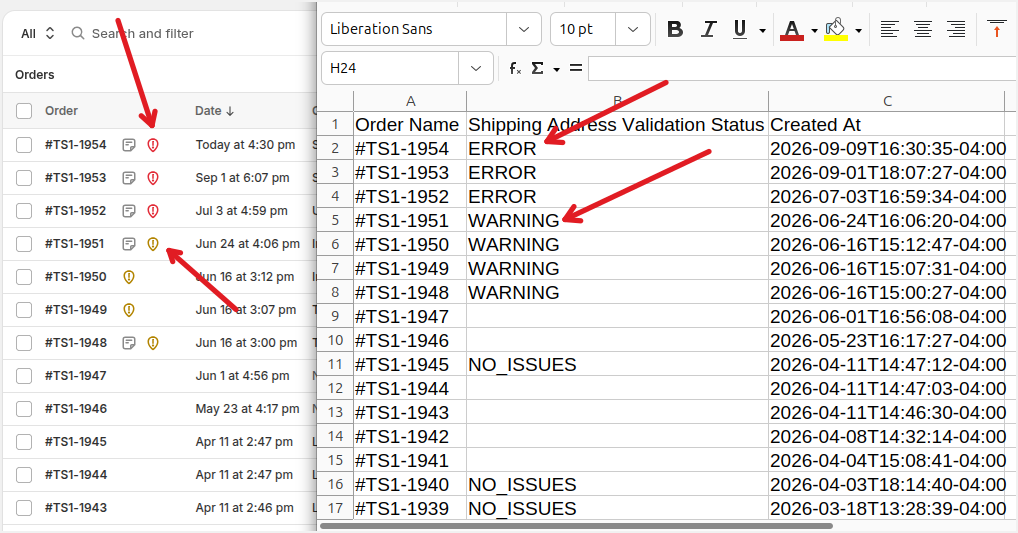
This field helps you determine whether the shipping address entered by the customer has potential issues, similar to what's displayed in the Shopify Admin. This allows you to flag orders with potenial shipping address errors when you generate yoru reports or filter them out when generating a CSV export to be sent to your 3PL, warehouse/ERP system, or fulfillment partner.
Here are the possible values for this field:
shipping_address.validation_result_summary |
Shipping Address Validation Status (type: text). The validation status that is leveraged by the address validation feature in the Shopify Admin. Valid values:
|
Here's an example of what those look like in the Shopify Admin and what the output would be in the exported CSV/Excel file.
Tags: ez exporter, new features